 TradeLinkers
A diary that copes with real jobs.
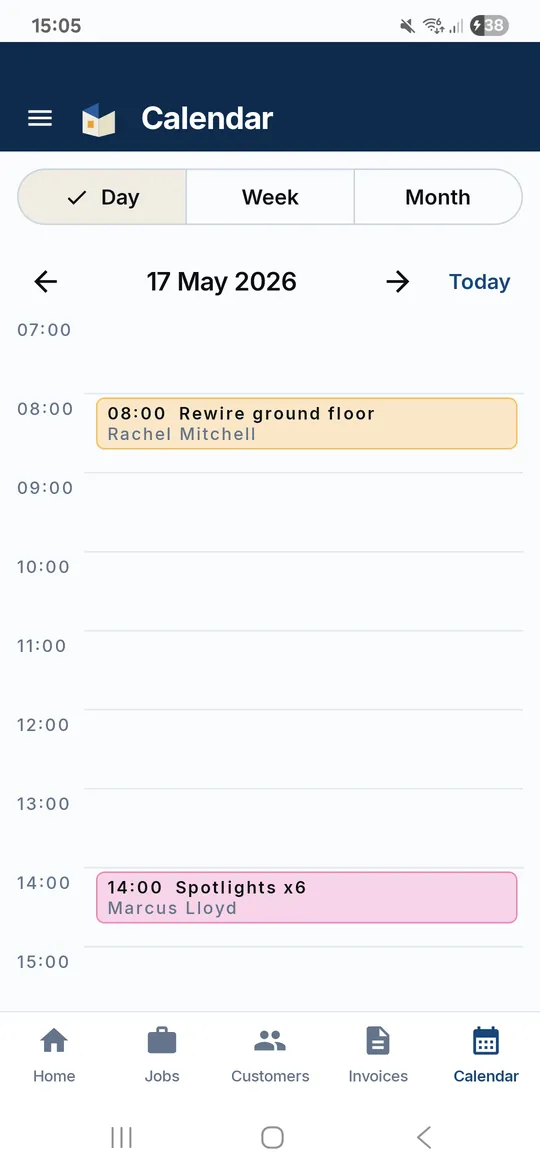
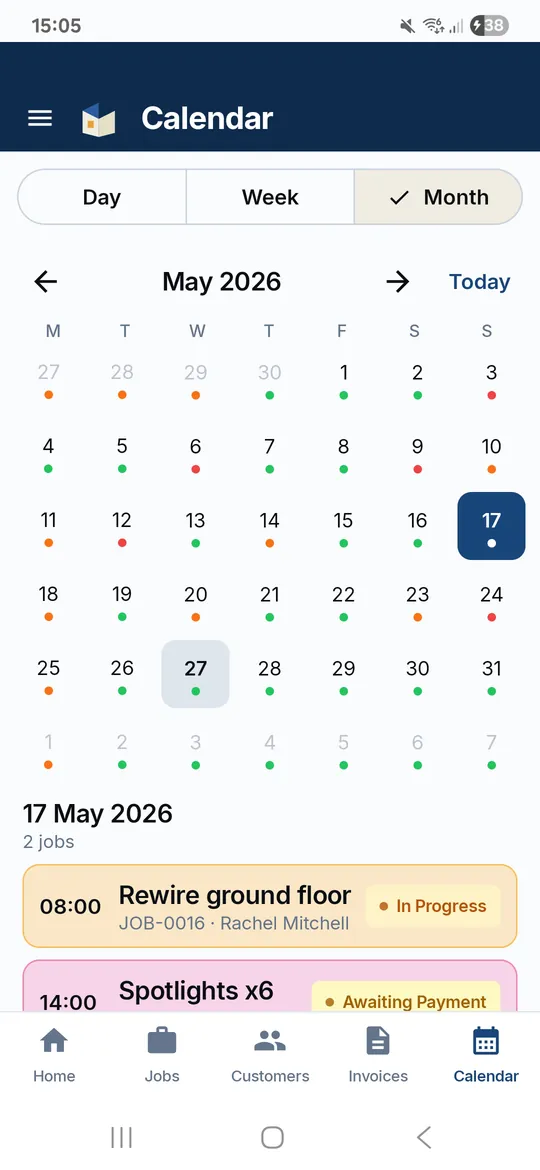
TradeLinkers puts every booked job in a day, week or month view. Book one job across several separate days, block out holidays and part days, and move a job with the reschedule sheet, which can email the customer the new time. A private calendar link shows it all in Google, Outlook or Apple Calendar.

14 days free, no card. Then £9.99 a month for everything.
Scheduling and calendar, the way a trade needs it
Day, week and month
See today, the week ahead or the whole month on your phone. The web app adds an agenda list for the office.
One job, several days
Book a job on separate days, each with its own start time. Monday and Tuesday, then back on Friday? One job, three visits.
Move it without the faff
The reschedule sheet moves a job to new days and times, with an optional email telling the customer. Or nudge it a day either way.
Time off and blocked time
Holidays, van services, half days. Block out date ranges or part days, repeat them weekly, and get warned about clashes.
In Google, Outlook or Apple
A private calendar link shows your booked jobs and time off in the calendar you already use. It updates one way, from TradeLinkers out.
The whole team
Assigned jobs show in each person's list, and the team calendar shows who is where.
Three steps
Book it in
Give the job a date and time and it becomes Booked In. Add more days if it runs on.
Move it when life happens
Rain, a supplier, a no-show. Reschedule and tell the customer in the same step.
See it everywhere
On your phone, on the web, and in Google or Outlook through your calendar link.
Scheduling and calendar: questions trades ask
Can I sync my jobs with Google Calendar or Outlook?
Yes. Each person gets a private calendar link that adds booked jobs and time off to Google Calendar, Outlook or Apple Calendar. It is one way: changes made in Google or Outlook do not come back into TradeLinkers.
Can one job run over several days?
Yes. A job can be booked on several separate days, each with its own start time, so a two-day install followed by a return visit is still one job with one invoice.
How do I tell a customer I need to move their job?
Use the reschedule sheet on the job. Pick the new days and times and leave the email option on, and the customer gets an email with the new booking.
Can I block out holidays?
Yes. Add time off for a date range or part of a day, with a reason such as holiday or van service, and repeat it weekly if it is regular. The diary warns you if you book over it.
Can customers book a time slot themselves?
Not a time slot. Customers send the job through your booking link, and you choose the date and time when you book it in.
What it does not do yet
- Calendar sync is one way, out to Google, Outlook or Apple.
- No drag-and-drop in the calendar. Use reschedule or the one-day nudge.
- No repeat or recurring jobs yet.
- No route planning between jobs.
Day rate calculator
What to charge per day to hit the income you want.
Job price calculator
Labour, materials, markup and VAT in one sum.
How do you price a job as a tradesperson?
Price a job from your real costs: a day rate, materials markup, call-out, travel and contingency, then VAT if you're registered. With a worked example.
Should you take a deposit, and how much?
When to take a deposit, how much to ask for, the 14-day cancellation rules for work agreed in a customer's home, and what to put on the quote.
How trades use it
Try it on your next job.
14 days free, no card needed. After that it's £9.99 a month for everything, and you can cancel any time.
Android app on Google Play. On an iPhone or a computer, use the web app with the same account.