 TradeLinkers
Emergency call-outs in, invoices out from the doorstep
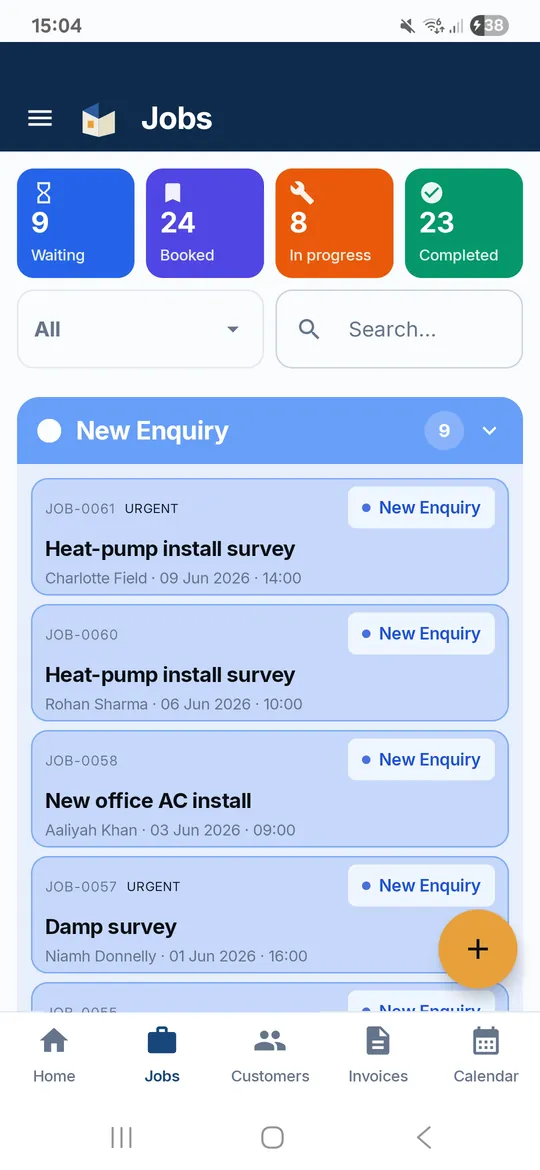
TradeLinkers puts emergency enquiries from your booking link on your phone as a push notification, with the customer's address already on a New Enquiry job. Tap Directions, send On my way, and when the door's open, invoice from the doorstep with call-out and parts on separate lines and a SCAN TO PAY code for your own pay link.

14 days free, no card. Then £9.99 a month. iPhone users can use the web app.
Typical locksmith jobs, all in one list
Any job works. These are the ones a locksmith books in most weeks.
What changes when a locksmith runs the paperwork on TradeLinkers
Emergency enquiries, straight to your phone
Customers fill in your booking link, choose Emergency and say what's happened. It becomes a New Enquiry job with their address, your phone gets a push notification, and they get a confirmation email.
Directions and On my way
Tap Directions to open Google Maps, then send an On my way email from the job, so the customer knows someone is actually coming and stays put.
Paid before you leave
Invoice from the doorstep. Add your own pay link from your bank or card provider and the invoice carries a SCAN TO PAY QR code, then mark it paid as card, cash or bank transfer.
Lock changes for landlords and agents
For new-tenant lock changes, save the property with landlord and tenant details, and keep key handover details in the access notes. Invoice the agent, and the next call to that address has the history.
Block out the nights you are off
Mark time off or part days in the calendar, repeating weekly if you like, so you only take night work when you're covering. You get a clash warning if a job lands on it.
Upgrade estimates on the spot
Found weak cylinders on every door? Send an estimate for anti-snap upgrades before you leave. The customer accepts online by typing their name, and you book the return visit.
What a locksmith's invoice looks like
Call-out, entry and parts on their own lines, so the customer can see why an evening visit costs what it does. Sent from the doorstep, with your pay link as a QR code if you use one.
Example figures to show the layout, not a price guide. Your own prices, business details, bank details and VAT setting go on the real thing.
| Description | Qty | Amount |
|---|---|---|
| Emergency call-out, evening | 1 | £90.00 |
| Non-destructive entry, uPVC front door | 1 | £65.00 |
| Anti-snap euro cylinder, supplied and fitted | 1 | £85.00 |
| Additional keys | 2 | £16.00 |
Straight answers
Does the 14-day cancellation right apply to emergency lockouts?
Often not. Under the Consumer Contracts Regulations, the 14-day right to cancel doesn't apply when the customer specifically asked you to visit their home to carry out urgent repairs or maintenance. It can still apply to extra services you sell on the same visit, and to goods other than the replacement parts needed for the repair, so an upgrade to every lock in the house may be covered by the normal rules.
Put the urgent work and any extras on separate invoice lines so it's clear which is which.
How do I make sure a call-out fee gets paid?
Say it before you set off. Give the call-out charge, the rate for the work and any out-of-hours premium on the phone, then confirm it by email or message so there's a record. If the customer finds their keys while you're on the way, you've both already agreed what the trip costs.
In TradeLinkers the call-out is its own line on the invoice, so you can bill it alone or with the work, and send it from the doorstep with a QR code for your pay link.
What should I check before opening a door for someone?
That they live there. Ask for ID and something showing the address, such as a bank statement or a utility bill on their phone, and if they can't show either, think twice before you open up.
In TradeLinkers, write down what you checked in the customer's notes, alongside the name, phone, email and address from their booking, so you have a record if questions come up later.
Do I need to send an invoice for a cash job?
It's good practice and it protects you. A numbered invoice is the customer's proof of what was fitted, and it's your record for your tax return. GOV.UK says self-employed people must keep records for at least five years after the 31 January submission deadline for the tax year.
In TradeLinkers, create the invoice, mark it paid as cash in one tap and email it to the customer. Invoices are numbered in order, INV-0001 upwards.
What TradeLinkers does not do yet
- No card payments built in. Take card with your own provider and put its pay link on the invoice as a QR code.
- No SMS. Customers hear from you by email, or you call or WhatsApp them from the job.
- Locksmith work goes under Other in the fixed job categories, and the booking form shows the same choices.
- No App Store app. iPhone users run the web app from Safari (how).
Tell us what would help: get in touch. The person who reads it builds the app.
Tools and guides
Free invoice template
Fill it in, download a PDF. No sign-up.
VAT calculator
Add or take off VAT at 20%, 5% or 0%.
What must be on an invoice in the UK?
What a UK invoice must show for sole traders and limited companies, full and simplified VAT invoices, invoice numbering, dates, payment terms and bank details.
How do you price a job as a tradesperson?
Price a job from your real costs: a day rate, materials markup, call-out, travel and contingency, then VAT if you're registered. With a worked example.
Run your locksmith paperwork from the van.
14 days free, no card needed. After that it's £9.99 a month for everything, and you can cancel any time.
Android app on Google Play. On an iPhone or a computer, use the web app with the same account.