 TradeLinkers
Knock-throughs, extensions and garden walls, from estimate to final invoice
TradeLinkers helps builders price the job as an estimate, take a deposit against it, book the work across several separate days and assign the team. When it's finished, the estimate becomes the invoice in one tap with the deposit carried over, VAT added if you're registered, and part payments tracked against the balance.

14 days free, no card. Then £9.99 a month. iPhone users can use the web app.
Typical builder jobs, all in one list
Any job works. These are the ones a builder books in most weeks.
What changes when a builder runs the paperwork on TradeLinkers
One job, several separate days
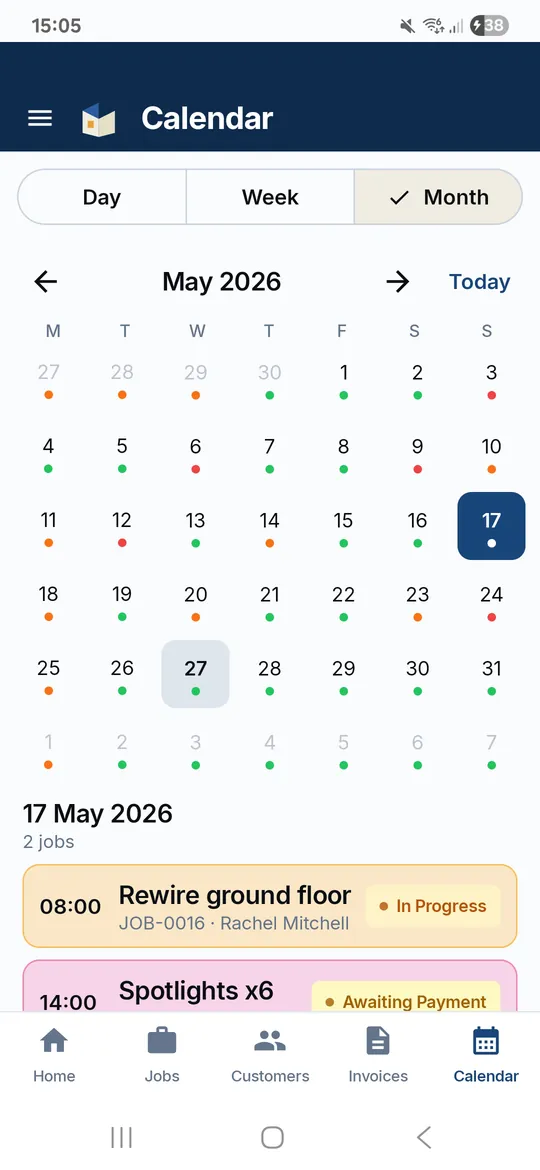
Book the extension on the days you'll actually be there, each with its own start time, leaving gaps for concrete to cure or building control to visit. The reschedule sheet moves one day or all of them.
Deposit against the estimate
Set the deposit as a percentage on the estimate and email the request. Once it's paid it carries onto the invoice, and later payments are recorded as part payments with the balance on the PDF.
The whole gang on the same page
Invite your labourers and trades by email. Assign each one jobs, they see their days on My jobs and the team calendar, and mark work done from site. The contractors directory keeps subbies' day rates.
Estimates the customer accepts online
The customer gets the estimate as a PDF with an Accept button, types their name and taps Accept or Decline. You get an email with the answer, and the valid-until date stops an old price lasting forever.
Drawings and approvals in one place
Attach the drawings, structural calculations and building control paperwork to the job. The customer gets an email, sees them in their portal, and can upload documents back to you there.
VAT shown properly
Mark your business VAT registered with its number and invoices show VAT at the rate you choose, with the number printed. Not registered? No VAT lines appear at all.
What a builder's invoice looks like
Labour shown as person-days, materials and the skip on their own lines, and VAT at 20% because this builder is VAT registered. The deposit paid on the estimate carries onto the invoice, and the PDF shows what's left to pay.
Example figures to show the layout, not a price guide. Your own prices, business details, bank details and VAT setting go on the real thing.
| Description | Qty | Amount |
|---|---|---|
| Steel beam, padstones and temporary props | 1 | £880.00 |
| Labour: two builders, three days (per person per day) | 6 | £1,320.00 |
| Plastering and making good, both sides | 1 | £480.00 |
| Skip hire and waste removal | 1 | £320.00 |
Straight answers
Do builders have to charge VAT?
Only if you're VAT registered. Registration is compulsory once your taxable turnover goes over £90,000 in any rolling 12 months, or if you expect it to within the next 30 days. Once registered, work on existing homes, such as extensions and alterations, is normally standard-rated at 20%. Some work has other rates: building new homes is zero-rated, and converting a building into homes or renovating a home that has been empty for two years or more can be 5%.
See VAT for tradespeople and the VAT calculator.
Does TradeLinkers handle CIS?
No. TradeLinkers doesn't calculate CIS deductions or produce CIS statements. CIS applies between contractors and subcontractors on construction work; HMRC doesn't treat a homeowner having work done on their own house as a contractor, so private domestic jobs fall outside it. If you pay subcontractors for construction work, you must register as a contractor, and deductions are 20% for registered subcontractors and 30% for unregistered ones.
Keep subbies' day rates in the contractors directory and handle CIS with your bookkeeping or accountant.
Should I give a quote or an estimate for building work?
A fixed quote for work you can see and measure, an estimate where the unknowns are real: old foundations, what's behind the plaster, how much the ground falls. Either way, write down what's included, what isn't and what would change the price.
TradeLinkers numbers estimates EST-0001 upwards and gives each a valid-until date, 30 days unless you change it. Read quote or estimate for more on the difference.
How do I bill extra work that wasn't on the estimate?
Agree it before you do it, and get the price in writing, even if that's a quick email. An extra the customer agreed to is much easier to get paid for than a surprise on the final bill.
In TradeLinkers, send a custom message from the job confirming the extra and its price. When you create the invoice from the estimate, add the extra as its own line, so the original price and the additions are both clear.
What TradeLinkers does not do yet
- No CIS deductions or statements. Handle CIS in your accounts.
- Job categories are Electrical, Plumbing, Gas & Boilers, Air Con and Other, so building work goes under Other, and your booking form shows the same choices.
- No time sheets or expenses. Labour goes on the invoice as days or hours.
- No card payments built in. Your own pay link can go on the invoice as a QR code.
Tell us what would help: get in touch. The person who reads it builds the app.
Tools and guides
Job price calculator
Labour, materials, markup and VAT in one sum.
VAT calculator
Add or take off VAT at 20%, 5% or 0%.
Should you take a deposit, and how much?
When to take a deposit, how much to ask for, the 14-day cancellation rules for work agreed in a customer's home, and what to put on the quote.
Do tradespeople have to charge VAT?
When UK trades must register for VAT: the £90,000 threshold, voluntary registration, the 20%, 5% and 0% rates, and the construction reverse charge.
Quote or estimate: what's the difference?
A quote is a fixed price once accepted, an estimate is your best guess. What to put on each, how long a quote stays valid, and how to handle extra work.
Run your builder paperwork from the van.
14 days free, no card needed. After that it's £9.99 a month for everything, and you can cancel any time.
Android app on Google Play. On an iPhone or a computer, use the web app with the same account.