 TradeLinkers
Every job, from first call to paid, in one list.
TradeLinkers tracks every job through New Enquiry, Booked In, In Progress, Completed, Awaiting Payment and Paid. Changing the status emails the customer, the invoice moves the job along by itself, and everything about the job, from the address and access notes to certificates and files, sits on one screen.

14 days free, no card. Then £9.99 a month for everything.
Job tracker, the way a trade needs it
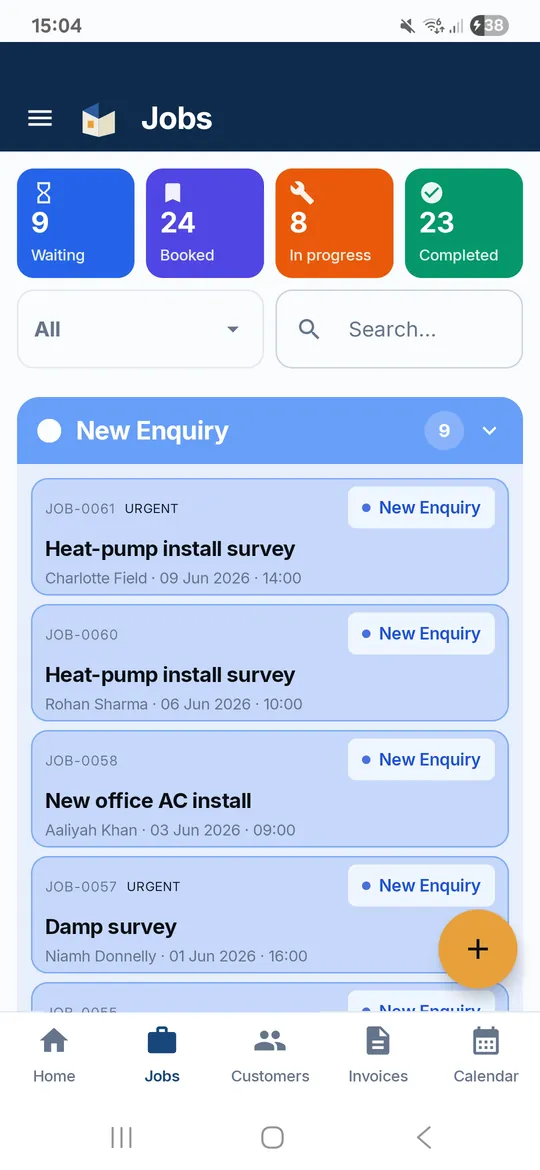
One status for every job
New Enquiry, Booked In, In Progress, Completed, Awaiting Payment, Paid. Counters at the top show what is waiting, booked and in progress.
Customers kept in the loop
Changing the status emails the customer. Tap On my way, On site, Running late or Completed to send a quick update by email.
Certificates and files on the job
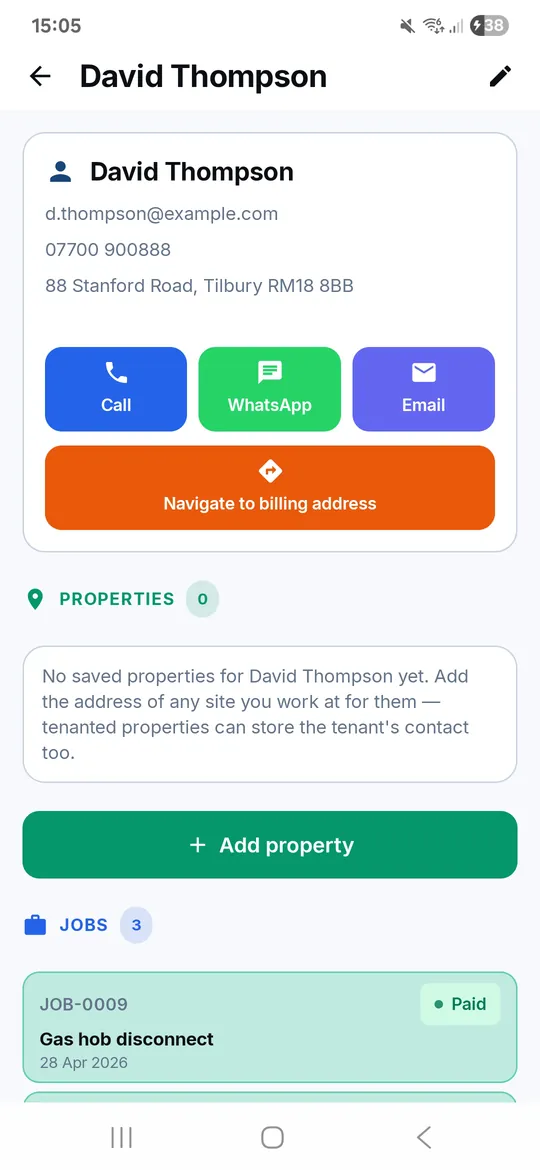
Attach certificates, contracts, photos or any PDF from your phone. They are kept with the property and shared with the customer in their portal.
Tenants, landlords, access
For rented properties, keep tenant and landlord names and numbers and access notes on the job or the saved property.
Get there, get hold of them
Directions in Google Maps, call, WhatsApp or email the customer in one tap from the job.
Works in a plant room
The Android app saves your changes on the phone with no signal and syncs them when you are back online.
Three steps
Enquiry in
From your booking link, a call or a message. It goes in as a New Enquiry with urgency marked.
Booked and done
Add a date and time and it is Booked In. Mark it In Progress, then Completed when the work is done.
Invoiced and paid
Send the invoice and it moves to Awaiting Payment. Mark it paid and it is done, then archived.
Job tracker: questions trades ask
What stages does a job go through?
New Enquiry, Booked In, In Progress (or Delayed), Completed, Awaiting Payment, Paid, and finally Archived. A job can be Cancelled at any point. Booking a date and time, sending the invoice and marking it paid move it along for you.
Do customers get updates?
Yes, by email. Changing a job's status emails the customer if you have their email address, and you can send On my way, On site, Running late, Completed or your own message from the job. There are no text messages.
Can I attach certificates to a job?
Yes. Pick any file from your phone, such as an electrical certificate or a gas safety record, and tag it. It is stored with the property and the customer can see it in their portal, with an email to say it is there.
Can my team see and update jobs?
Yes. Invite them by email and assign jobs. Each person gets their own login with a list of their jobs and the team calendar, and can mark a job done from site.
Can I bring my existing customers over?
Yes. Import your customer list from a CSV file in the web app. Jobs and invoices start fresh in TradeLinkers.
What it does not do yet
- No camera inside the app. Take photos as normal and attach them from your gallery.
- No customer signatures on screen.
- No time tracking, timesheets or mileage.
- No repeat or recurring jobs yet.
Job price calculator
Labour, materials, markup and VAT in one sum.
Free invoice template
Fill it in, download a PDF. No sign-up.
How do you price a job as a tradesperson?
Price a job from your real costs: a day rate, materials markup, call-out, travel and contingency, then VAT if you're registered. With a worked example.
How do you chase an unpaid invoice?
How to chase an unpaid invoice step by step: reminder timings, statutory interest and £40 to £100 compensation for business debts, and small claims.
Try it on your next job.
14 days free, no card needed. After that it's £9.99 a month for everything, and you can cancel any time.
Android app on Google Play. On an iPhone or a computer, use the web app with the same account.